
E-paper display labels keep tool identity, availability, and service status visible without continuous display power.
Industrial tool cribs, maintenance rooms, and production-line stores need accurate information at the point of use. Technicians need to know which drawer contains a tool, whether it is available, when it was last inspected, whether it is calibrated, and where it should be returned. Paper labels are easy to start with, but they become stale as inventory and maintenance status change.
An e-paper display for industrial tool management can make drawer labels, cabinet panels, and equipment-linked tool stations easier to update while keeping power consumption low between changes. The image remains visible without continuous display power, which is useful for battery-operated labels and locations where wiring is inconvenient. For OEMs, the opportunity is not just a display module; it is a durable information product that fits a real factory workflow.
Identify the Information That Must Stay Visible
Start with the decisions made at the cabinet. A technician may need a tool image, a category, a location indicator, an availability state, a calibration reminder, a loan status, or a simple instruction. A supervisor may need to confirm that controlled tools have been returned before a shift change. Maintenance teams may also link a tool record to a work order or production asset.
E-paper works best for information that changes by event rather than every second. A label can update when a tool is issued, returned, checked, moved, inspected, or scheduled for calibration. It is not intended for animated dashboards, video, or high-speed user interaction. Those active functions are generally a better fit for industrial TFT LCD modules.
Define the minimum useful information before choosing screen size. A small drawer label has different needs from a wall-mounted cabinet panel or a mobile service cart. Simple, high-contrast layouts are usually more reliable than trying to shrink a full warehouse application onto a small reflective panel.
Build Around the Full Tool-Crib Workflow
An effective system connects the label to the workflow that changes it. Common inputs include a barcode scanner, RFID reader, locker controller, maintenance system, or shop-floor inventory application. The display can show a confirmed state after the back-end system accepts the event, rather than guessing whether a transaction succeeded.
For an equipment OEM, the same principle applies to integrated tool kits, service cabinets, spare-parts lockers, and calibration stations. Sunshine Display can help compare industrial display module options and define a custom e-paper product path that matches the controller, enclosure, and operating environment.
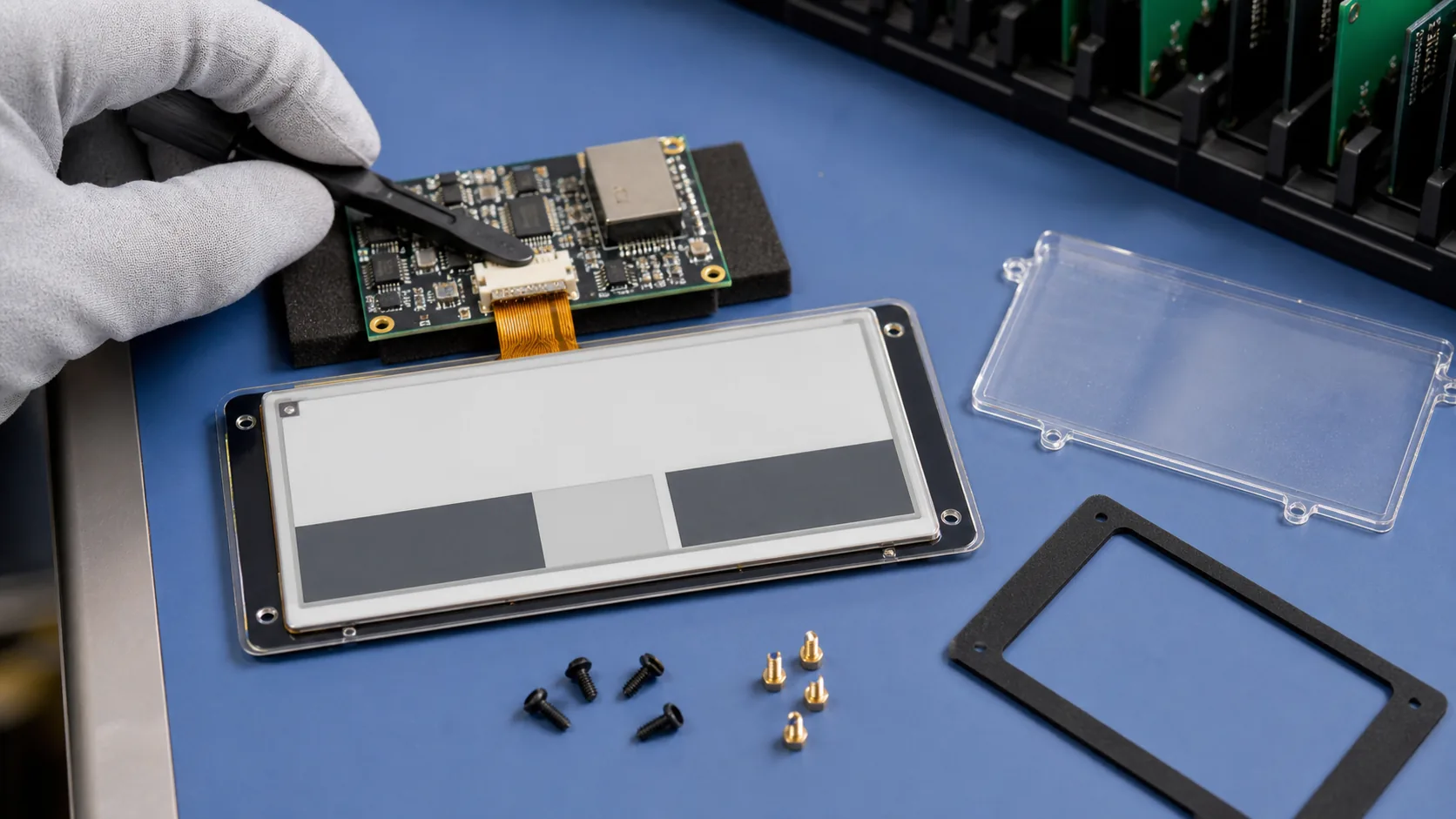 Module, controller, FPC, protective cover, gasket, and mounting system should be engineered as one industrial product assembly.
Size, Resolution, and Color Should Follow the Job
The screen should be readable from the normal working position. Compact e-paper modules can suit drawer fronts, bins, instruments, and portable kits. Larger panels can present a tool profile, safety symbol, task instruction, location map, or multiple status fields. Resolution affects the quality of small text, line drawings, and machine-readable codes, but it also affects memory, transfer time, and controller requirements.
Black-and-white e-paper is often the most direct option for durable tool labels because it offers good contrast and simple content design. Black-white-red or black-white-yellow panels can add emphasis to a restricted, overdue, or calibration state. Color e-paper can be useful for more detailed identification, but it should be evaluated with the actual screen layout, temperature range, refresh time, and power budget.
The product team should choose the display using sample content, not only a specification table. Test tool silhouettes, warning states, location graphics, QR-style codes, and small fields from realistic distances under the lighting found in the tool room.
Engineer the Module Into a Durable Product
An e-paper panel is one part of an industrial assembly. The controller board, FPC routing, battery or wired power input, wireless antenna, enclosure, front cover, gasket, mounting points, and service access all affect final reliability. A clear front window must protect the display without creating excessive reflection or mechanical pressure.
Drawer impacts, vibration, cleaning chemicals, dust, electrostatic discharge, and accidental removal should be considered early. Confirm connector retention, screw locations, enclosure tolerances, and how the unit will be replaced in service. If the label uses a battery, define realistic update frequency, sleep current, expected battery life, and replacement procedure.
OEM customization may include a selected module, controller and interface, enclosure tooling, custom front graphics, firmware, wireless communication, battery system, programming, testing, and packaging. These requirements should be discussed before the mechanical design is frozen. Contact Sunshine Display to review an industrial e-paper module or custom tool-label product.
Manage Refresh Behavior and Power Honestly
E-paper uses very little power while displaying a stable image, but an update does use energy. Measure the entire transaction: controller wake-up, data transfer, wireless communication, panel refresh, and return to sleep. The expected number of issue and return events per day, temperature, network retries, and battery chemistry all influence the actual service interval.
Full refresh can take longer than an LCD update and may visibly flash. Partial refresh can improve response for selected regions, but repeated partial updates can introduce ghosting on some technologies. Use the panel supplier's controller and waveform guidance, then test the content patterns that will appear in the product.
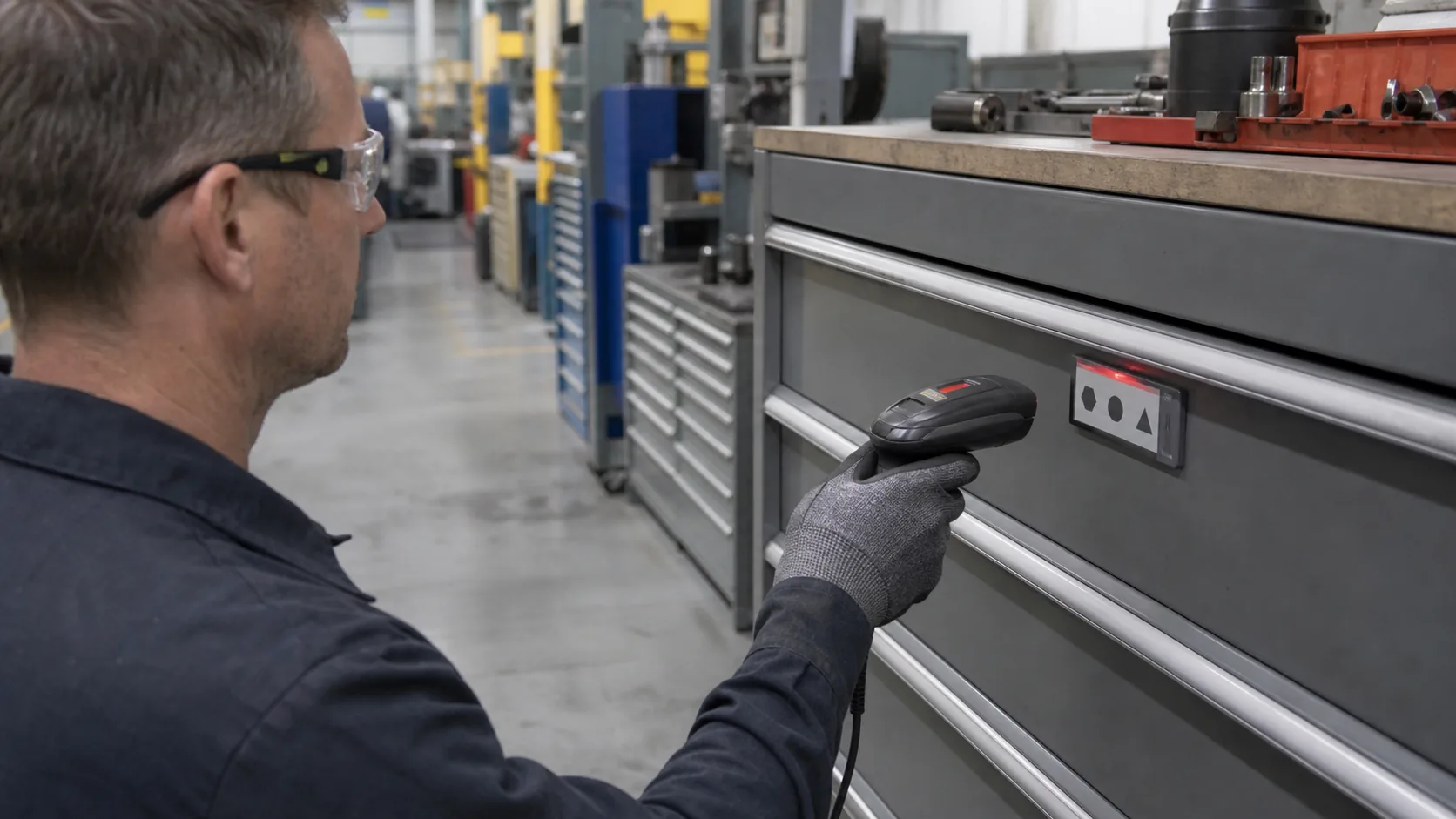 Factory validation should check scanning, update recovery, visibility, enclosure durability, and real maintenance workflow fit.
Validate on the Actual Shop Floor
Bench tests are necessary, but field testing finds the issues that matter to technicians. Install samples on representative drawers or cabinets. Test scanning angle and distance, update success after power loss, display readability under factory lighting, dust and cleaning exposure, battery replacement, enclosure mounting, and tool-room traffic.
Run workflow trials with real users. Watch whether people can locate tools faster, understand restricted states, return equipment to the right place, and recognize when a record needs attention. Capture failed scans, delayed updates, ghosting, mechanical damage, and network recovery events before pilot production.
Also ask about supply continuity. Confirm module lifecycle, controller availability, approved alternatives, change notification, and firmware ownership. For a long-running industrial program, a stable supply plan is as important as initial image quality.
Practical RFQ Checklist
For a productive quotation, provide the tool-management application, target screen size, active area, resolution, color mode, intended viewing distance, update frequency, interface, power source, battery target, wireless method, operating temperature, enclosure concept, mounting, annual volume, and required OEM scope. Share sample screens and mechanical drawings where possible.
Sunshine Display supports industrial display modules and custom e-paper display solutions for OEM projects. A focused review of the workflow, electronics, mechanics, and supply plan makes it much easier to choose the right module and develop a product that can survive daily factory use.
FAQ
Why use e-paper displays for industrial tool management?
E-paper preserves the last image without continuous display power, remains readable under bright ambient light, and can replace paper drawer cards or shelf labels that become outdated.
Can an e-paper label show real-time tool availability?
Yes, if the update rate matches the workflow. E-paper is well suited to events such as issue, return, inspection, calibration, or location changes, rather than fast-moving live data.
What can be customized in an industrial e-paper tool label?
Depending on technical feasibility and volume, OEM customization can include display size, controller, FPC, battery, wireless interface, enclosure, mounting, front cover, firmware, and complete product assembly.
